
 TapToConnect
All your socials.
One calendar.
Socialschedulr is a social media planner for small businesses and agencies, made in the Netherlands. Write your post once and schedule it on all your channels at once.
Free forever with 3 channels. No payment details needed.
Ask Claude, ChatGPT, Copilot or Grok.
Socialschedulr works with the AI assistant you already use. Ask in plain language what you want to schedule or know. After you confirm, it is in your calendar, with the same rules and approval as in the app.
And any other assistant that supports MCP. Free in every plan, including Free.
Schedule this tomorrow at 9:00 on LinkedIn and Instagram.
What is scheduled this week?
Which posts did best last month?
Socialschedulr in 45 seconds.
From one post to all your channels, your team, your client and your report.
Works with the channels your customers actually use.
Less switching. More posting.
No more six apps open and loose lists in Excel. Your whole schedule, your team and your numbers in one place.
One post. Every channel in its own format.
Choose per channel whether it becomes a regular post, Reel, story, Short or TikTok video. Socialschedulr shows what is still missing before you schedule.
- Its own text per channel, with a preview of how it will look
- Settings for YouTube, TikTok and Instagram
- Recurring posts and bulk scheduling via CSV
Approved before it goes live.
Invite colleagues with their own role. Posts by editors only go live after approval, even from a client without an account.
- Roles: owner, admin and editor
- Client link to approve without logging in
- First a colleague, then the client: approval in two steps
- Discussion on every post, internal or together with your client
See what works. And show it.
Reach, engagement and follower growth per channel, compared with the previous period. Download a PDF report with your own logo for your client, or a CSV for Excel.
- Best time to post, based on your own posts
- Sort every post by reach or engagement
- PDF report with your logo, also sent automatically every week or month
- Compare your Instagram with your competitors'
Your photos and videos, always at hand.
Everything you upload goes into a shared library. Pick files for a new post, crop them per platform and give them alt text that is kept.
- Up to ten photos per post, also as a carousel
- Crop to square, portrait or landscape
- Thumbnail for YouTube, cover for Reels
What you can post on each channel.
Every platform has its own rules. Socialschedulr knows them, so you don't have to think about them.
Post on your business Pages. With several Pages, you choose which ones to connect.
For business accounts. With a cover for Reels and a preview of your grid.
Your personal profile and your company Pages, with a first comment under your post.
TikTok
Post publicly, with every setting TikTok asks for: visibility, comments, Duet and Stitch.
X
Short posts with up to four photos or a video, and a first comment as a reply to your post.
YouTube
Videos and Shorts with title, visibility, category, tags and your own thumbnail.
The little things. That matter.
Handy helpers in the editor and the calendar that save you a lot of clicks every week.
Emoji and hashtags
An emoji picker and hashtag sets you add with one click.
Saved texts
Standard phrases, opening hours or disclaimers, ready to insert.
Best times
Three moments when your posts perform best.
First comment
Hashtags or a link right under your post on LinkedIn and X.
Recurring
The same post every day, week or month, until an end date.
Bulk via CSV
Schedule dozens of posts at once with one spreadsheet.
Holidays
Dutch and Belgian holidays and campaign days in your calendar.
Instagram grid
See how your profile looks with the posts that are still to come.
Trash
Deleted by accident? Restore it within 30 days.
UTM codes
See in Google Analytics which channel brings visitors.
Share your schedule
One link for your client to look along and approve.
API and AI assistants
Connect Claude or your own software via MCP or the API.
Live in three steps.
Your first post is scheduled within five minutes.
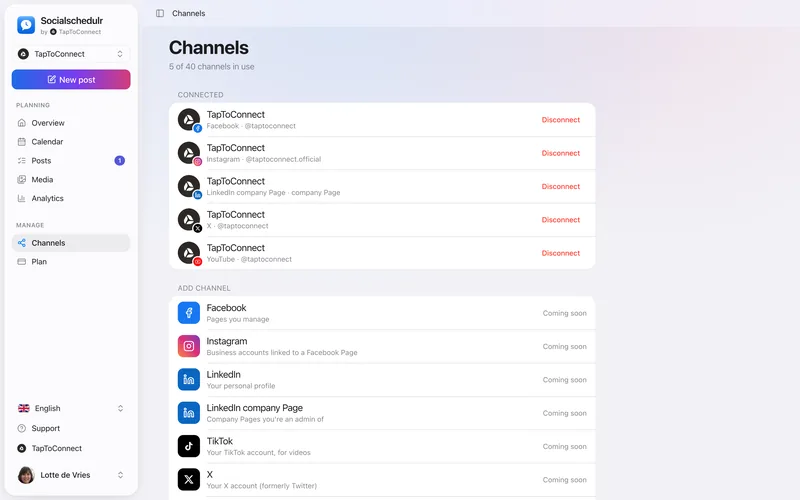
Connect your channels
Log in to Facebook, Instagram, LinkedIn, TikTok, X or YouTube and choose which Pages and accounts you want to manage.
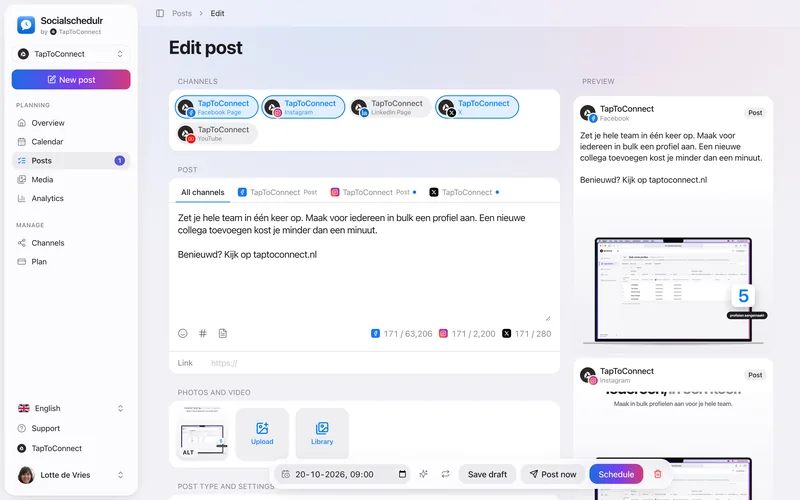
Write your post
Add text, a link and photos or video, and see right away how it looks on each channel.
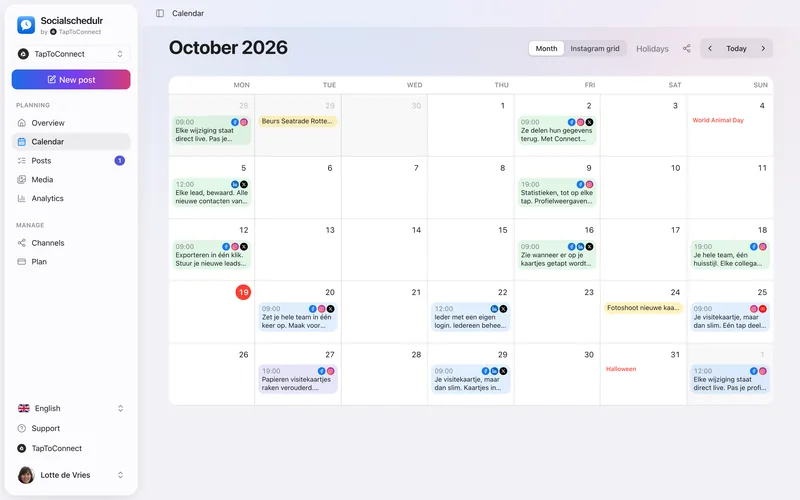
Schedule it
Pick a date and time, or let Socialschedulr suggest a good moment. We do the rest.
Why Socialschedulr?
Made for businesses, agencies and marketing teams in the Netherlands, Belgium and beyond.
Built for the Netherlands and Belgium
App, guides and help centre in Dutch and English.
Online on the minute
Platform hiccup? We retry automatically.
Everything in every plan
Even free: no features locked behind a bigger plan.
Made for agencies
Your client approves through one link and gets a monthly report with your logo.
Secure, in the EU
Two-step verification, activity log and servers in Europe.
Simple pricing.
Start with 14 days free. Then choose a plan or continue for free. Cancel any month, prices exclude 21% VAT.
Free
To get started
€0 / month
no payment details needed
- 3 channels
- 1 user
- 10 posts scheduled at a time
- All features
Starter
For freelancers and small businesses
€19 €15.83 / month
€190 billed yearly, excl. VAT
- 5 channels
- 1 user
- Unlimited scheduling*
- All features
Pro
For growing teams
€55 €45.83 / month
€550 billed yearly, excl. VAT
- 15 channels
- 5 users
- Unlimited scheduling*
- All features
Business
For agencies with several clients
€99 €82.50 / month
€990 billed yearly, excl. VAT
- 40 channels
- 15 users
- Unlimited scheduling*
- All features
Prices when paying yearly (2 months free). During the trial you can connect up to 3 channels.
* Unlimited scheduling falls under our fair use policy. Compare the plans


Questions? You talk to us.
Socialschedulr is made by Sam Ramaekers and Willem Boermans, the founders of TapToConnect. Ask your question by email and one of us will answer, not a chatbot.
Read who we areFrequently asked questions.
Can't find your question? Take a look in the help centre.
Do I need to enter payment details for the trial?
No. You create an account with your name, company name and email address and can try everything for 14 days right away, with up to 3 channels. Then you choose a plan, or you continue for free with 3 channels and 10 scheduled posts at a time.
What counts as a channel?
Every connected account is one channel. A Facebook Page, an Instagram account and a LinkedIn company Page are three channels together.
Can I cancel or switch at any time?
Yes. Plans can be cancelled monthly and you keep access until the end of the paid period. If you switch to another plan, the difference for the rest of the month is settled right away.
How do I pay and do I get an invoice?
You pay via Stripe, for example with iDEAL, Bancontact or a credit card. After that the amount is charged automatically every month. You download your invoices, with VAT shown separately, in the app. You can also enter your VAT number.
Can my client approve posts without an account?
Yes. You copy a client link for a post. Your client sees a preview per channel and chooses Approve or Needs changes. No login needed.
Can AI write my texts?
Socialschedulr doesn't write texts for you. You know your customers and your brand best. Already working with an AI assistant like Claude? Then connect it via MCP: it can view your schedule, schedule posts and look up your statistics, following the same rules as the app. There is also an API for your own integrations. More about integrations
What if a post can't be published?
Then we automatically try a few more times. If it still fails, the post gets the status Failed and you see the platform's error message, for example an expired connection. Once it's fixed, click Retry; channels where it already worked are skipped.
Where is my data stored?
On servers in the European Union. We store the access tokens for your channels encrypted. Read more in our privacy policy.
Need help?
The help centre explains step by step how to connect channels, schedule posts and manage your plan.