
 TapToConnect
How often should you post?
Per platform.
Consistency beats volume. Pick a rhythm you can keep up for months, not one you drop after two weeks.
In short
- For most small businesses, 3 to 5 posts a week on Instagram and Facebook and 2 to 3 on LinkedIn is realistic.
- Buffer found in 2025 that Instagram accounts posting 3 to 5 times a week grew more than twice as fast as accounts posting 1 to 2 times.
- Posting more helps, but each extra step adds less.
A realistic rhythm for small businesses
| Platform | Rhythm | Note |
|---|---|---|
| 3 to 5 a week | At least one Reel, stories in between | |
| 3 to 5 a week | Often the same posts as Instagram, with their own text | |
| 2 to 3 a week | Quality over quantity | |
| TikTok | 3 a week or more | Short videos, often |
| X | Daily | Short and topical |
| YouTube | 1 a week or every two weeks | Shorts can be more frequent |
Our advice for a business where one or two people handle social media. Stories are not included in these numbers.
Start small
Pick two channels where your customers are and do them well. With a scheduler you prepare a month in one afternoon: 12 to 20 posts.
Better fewer and good than many and rushed. A steady rhythm you keep up delivers more than a busy month followed by silence.
What does research say about posting more?
In August 2025, Buffer analysed 2.1 million Instagram posts from 102,000 accounts, comparing each account with itself. Stories were excluded.
| Posts per week | Follower growth per week | Reach per post vs 1 to 2 |
|---|---|---|
| 1 to 2 | +0.12% | Baseline |
| 3 to 5 | +0.26% | About 12% higher |
| 6 to 9 | +0.44% | About 18% higher |
| 10 or more | +0.66% | About 24% higher |
Source: Buffer, How often should you post on Instagram (August 2025).
The biggest gain is the first step, from 1 to 2 to 3 to 5 posts. After that, each step adds less. Weeks without posts showed lower growth than normal. It is a correlation, not a guarantee.
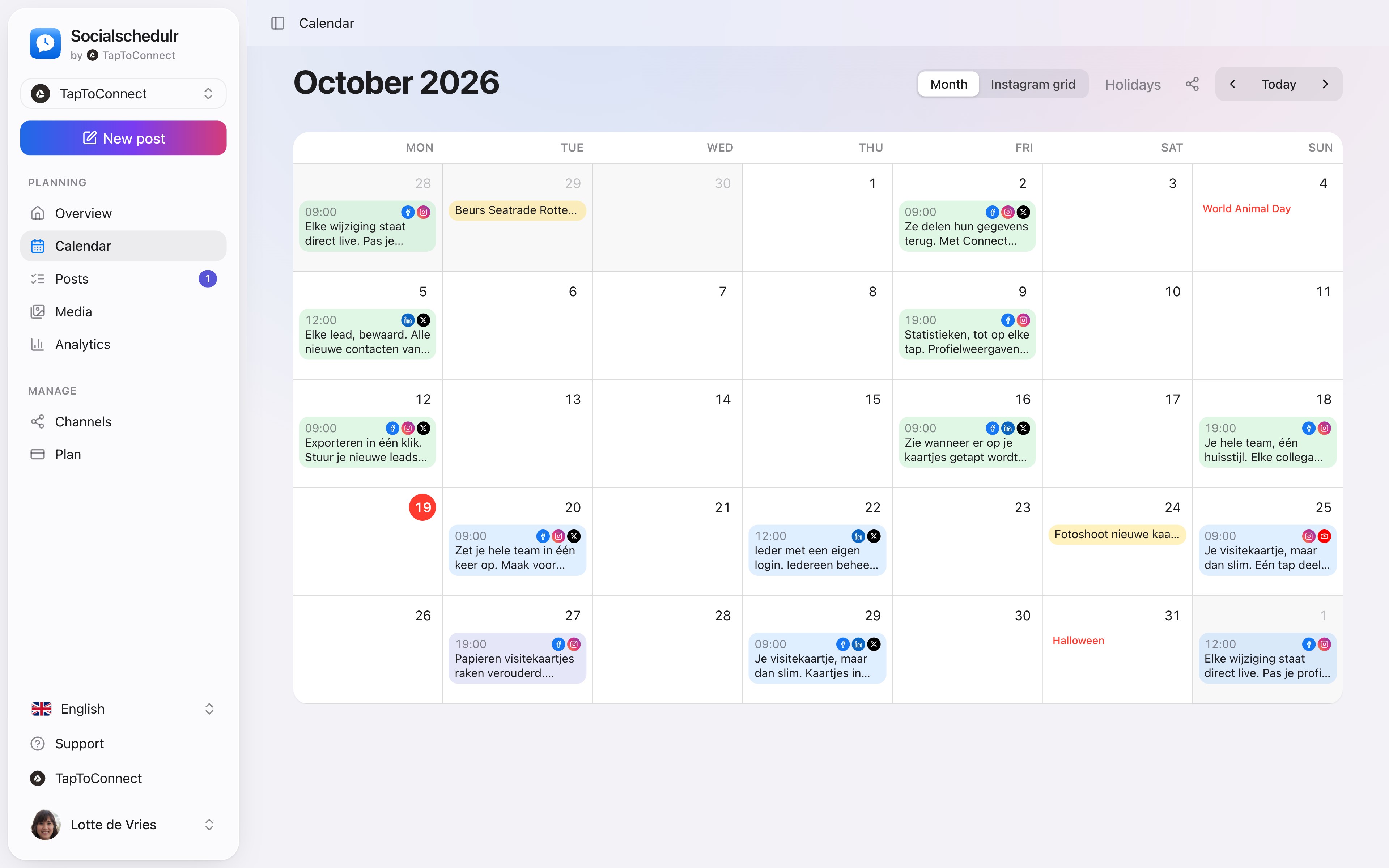
The monthly calendar with scheduled posts per day
What do the big tools recommend?
| Platform | Hootsuite advice (2025) | Our advice for small businesses |
|---|---|---|
| 3 to 5 a week, plus 2 Stories a day | 3 to 5 a week | |
| 1 to 2 a day | 3 to 5 a week | |
| 1 to 2 a day | 2 to 3 a week | |
| TikTok | 3 to 5 a week, or as much as you can | 3 a week or more |
| X | 2 to 3 a day | Daily |
Source: Hootsuite, How often to post on social media (April 2025). Hootsuite says its advice is partly based on marketers’ experience, not only on measurement.
Hootsuite writes for marketing teams. For a business where one person does social media on the side, twice a day on Facebook is not sustainable, and Buffer’s data shows the biggest gain is in going from occasional to three to five a week.
Keep it up by scheduling
Most businesses do not stop because they run out of ideas, but because it slips on busy days. So plan ahead at a quiet moment. With a recurring post you set up regular items, such as your opening hours or a weekly tip, once. A few evergreen posts on the shelf cover the busy weeks.
How to do this in Socialschedulr.
Your whole month at a glance.
All scheduled and published posts from all your channels in one monthly view. The colour tells you straight away whether something is scheduled, published or still a draft.
- Click a day to schedule a post right there
- Notes on a day, such as ‘campaign starts’ or ‘shop closed’
- Holidays and special days for the Netherlands and Belgium
- Schedule a post on any day from the calendar
Always know where things stand.
In the list of posts you filter on scheduled, draft, awaiting approval, published or failed. A recurring post has a weekly or monthly label.
- Repeat a post every day, week or month
- Failed? You see exactly why
- Deleted posts go to the trash first
Posts and calendar.
Spoken and subtitled in English. You will find more videos in the help centre.
See it in action.
A few parts of Socialschedulr that fit this topic, shown with sample data.
A report with your logo
In your client's inbox every month, automatically, white label too.
Reels, TikToks and Shorts
One video, the right format and settings per platform.
Try it yourself.
All your socials in one calendar. Free for 14 days, no payment details. After that, pick a plan or carry on for free.