
 TapToConnect
Schedule Instagram.
Posts, Reels and stories.
Plan your Instagram a month ahead, see in advance how your grid will look and let Socialschedulr publish everything at the right moment.
What you can schedule
- Photos and carousels of up to 10 photos and videos
- Reels, with your own cover and whether they appear in your feed
- Stories with a photo or video
- Published automatically, without a reminder on your phone
How to schedule it
- Connect your business Instagram account through the Facebook Page it belongs to.
- Click New post, choose Instagram and pick post, Reel or story.
- Add your photos or video from your media library and write your text.
- Pick a moment, or one of the three best times Socialschedulr suggests.
- Click Schedule. In the calendar, switch to Instagram grid to see how your profile will look.
Settings per post
Give your Reel its own cover, choose whether it also appears in your feed and add alt text for people using a screen reader. Socialschedulr checks in advance whether your photos and videos meet Instagram’s requirements, such as the ratio of a Reel. Read more in Reels, stories and Shorts.
Tips
- Plan 3 to 5 posts a week, with at least one Reel.
- Use the Instagram grid to see whether colours and photos fit together.
- Save your usual hashtags as a hashtag set, so you add them with one click.
- After a month, check Analytics to see which times work best for you.
What you need
A business Instagram account (business or creator) connected to a Facebook Page. A personal account cannot let a scheduler publish on Instagram. See Connecting Instagram.
Reels, stories and carousels
On Instagram you choose per post what it becomes:
- Photo or carousel: up to 10 photos and videos in one post. Crop them square or portrait 4:5; the latter stands out most in the feed.
- Reel: a vertical 9:16 video. Pick your own cover, so your Reel looks neat in your grid.
- Story: a photo or video that stays visible for 24 hours. Handy for today’s offer or a look behind the scenes.
Preview your feed
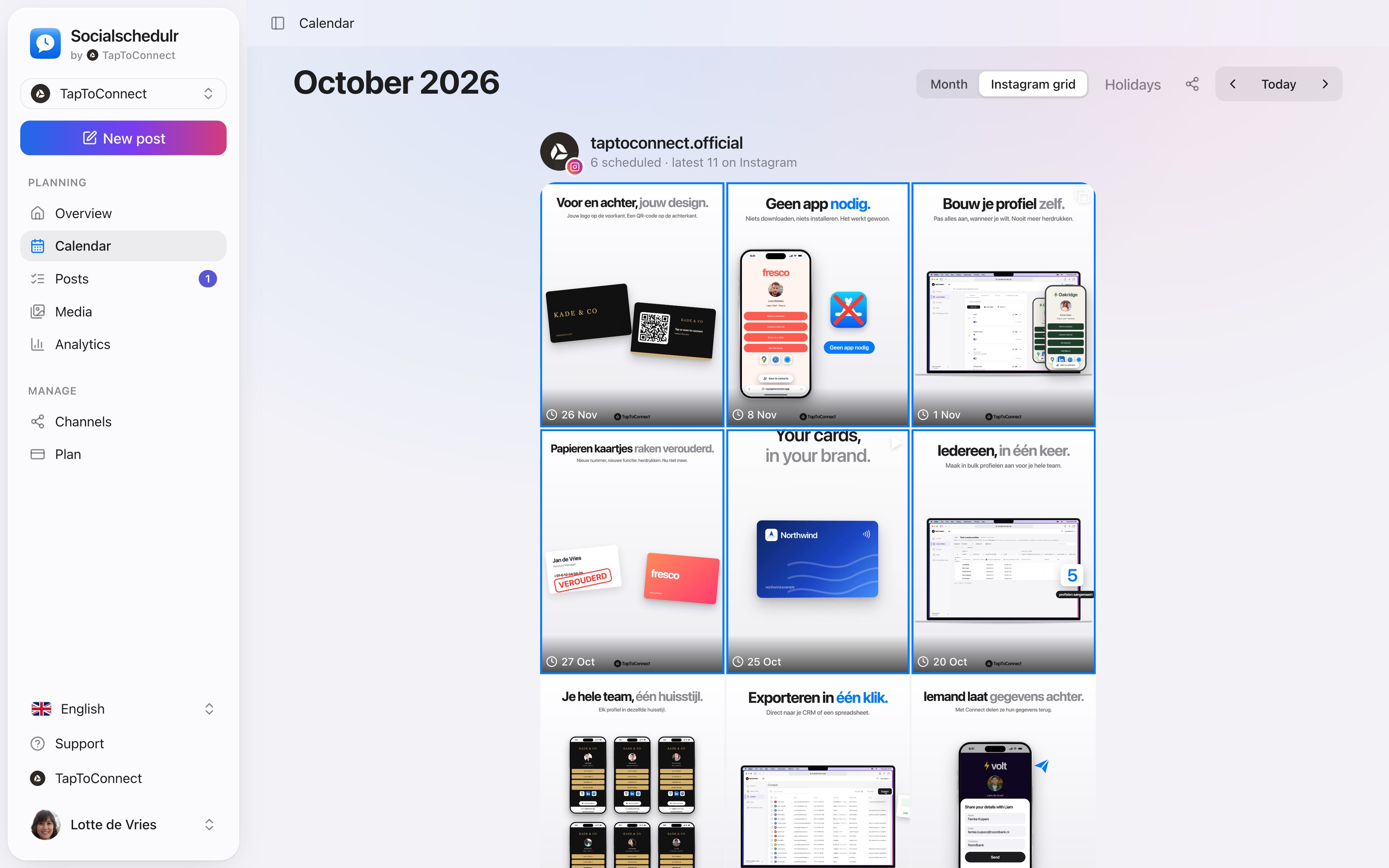
In the calendar you can switch to the Instagram grid view. It shows your scheduled posts above your latest real posts, exactly as your profile will look. Does a photo not fit in with the rest? Simply move it to another day.
Three ways to schedule Instagram posts
You do not always need a scheduler. There are three ways, each with its own pros and cons.
1. In the Instagram app itself. On a new post or Reel, tap Advanced settings and choose Schedule. According to the Instagram Help Center you need a professional account for this.
- Pros: free, quick on your phone, and you have every feature of the app, such as music from Instagram’s library.
- Cons: Instagram only, you schedule post by post on your phone and without a calendar overview.
2. In Meta Business Suite. Meta’s free tool for Facebook and Instagram, on your computer or in the app.
- Pros: free, Facebook and Instagram in one planner, stories too, and you can answer messages there as well.
- Cons: Facebook and Instagram only, and a client or colleague cannot approve without access to your account. See Meta Business Suite compared.
3. With Socialschedulr. Posts, carousels, Reels and stories in the same calendar as your other channels.
- Pros: LinkedIn, TikTok, X and YouTube too, an Instagram grid to preview your feed, approval through a link and your best times from your own analytics.
- Cons: paid from €19 per month (free for 3 channels), and not everything in the app is available through Meta’s official connection. Music from Instagram’s library and stickers in stories can only be added in the app.
Only use Instagram and post a few times a week? Then the app or Meta Business Suite is often enough. Schedule several channels or work with others, and a scheduler saves time.
Handy tools
In the editor you also have hashtag sets and saved text, cropping and alt text and UTM codes at hand.
How it works.
- 1
Connect Instagram
Go to Channels, choose Instagram and log in. Socialschedulr only gets permission to post on your behalf.
- 2
Write and pick the format
Write your text, add photos or video and choose per channel what it becomes. The preview appears on the right.
- 3
Pick a moment
Choose a date and time, or one of the three best moments from your own analytics. Done.
Scheduling Instagram in Socialschedulr.
See your feed before it goes live.
The Instagram grid view shows your scheduled posts above your latest real posts. So you know in advance whether colours and topics work well together.
- Scheduled posts with their date above your existing feed
- Click a post to edit it
- Also handy to show a client the feed in advance
The right format for each channel.
The same post can be a Reel on Instagram, a Short on YouTube and a regular post on Facebook. Socialschedulr checks whether your photos and videos meet the requirements of each platform.
- Reels and stories on Facebook and Instagram
- Carousels of up to 10 photos and videos on Instagram
- Shorts and videos on YouTube, with title, tags and thumbnail
- TikTok settings such as who can comment or make a Duet
Posts and calendar.
Spoken and subtitled in English. You will find more videos in the help centre.
See it in action.
A few parts of Socialschedulr that fit this topic, shown with sample data.
A report with your logo
In your client's inbox every month, automatically, white label too.
Everyone their own role
Owner, admin or editor, with an activity log of who did what.
Frequently asked questions.
Can I schedule Instagram stories?
Yes. Choose story for the post and add a photo or video. Socialschedulr publishes it at the chosen moment.
Does it work with a personal Instagram account?
No. Instagram only allows scheduling for business and creator accounts connected to a Facebook Page. Switching is free in the Instagram app.
Do I get a reminder to publish it myself?
No. Socialschedulr publishes your post itself, even when your phone is off.
Can I schedule with a personal account through a scheduler?
No. Meta only lets schedulers publish to professional accounts, so a business or creator account. That is in Meta’s developer documentation. Switching to a professional account is free and you keep your followers.
Business or creator account: which do I choose?
For scheduling it makes no difference: both are professional accounts and work with Socialschedulr. A business account suits a shop or service provider, a creator account someone who is the face of their own account.
Read next
Try it yourself.
All your socials in one calendar. Free for 14 days, no payment details. After that, pick a plan or carry on for free.