
 TapToConnect
UTM codes.
See what each channel brings in.
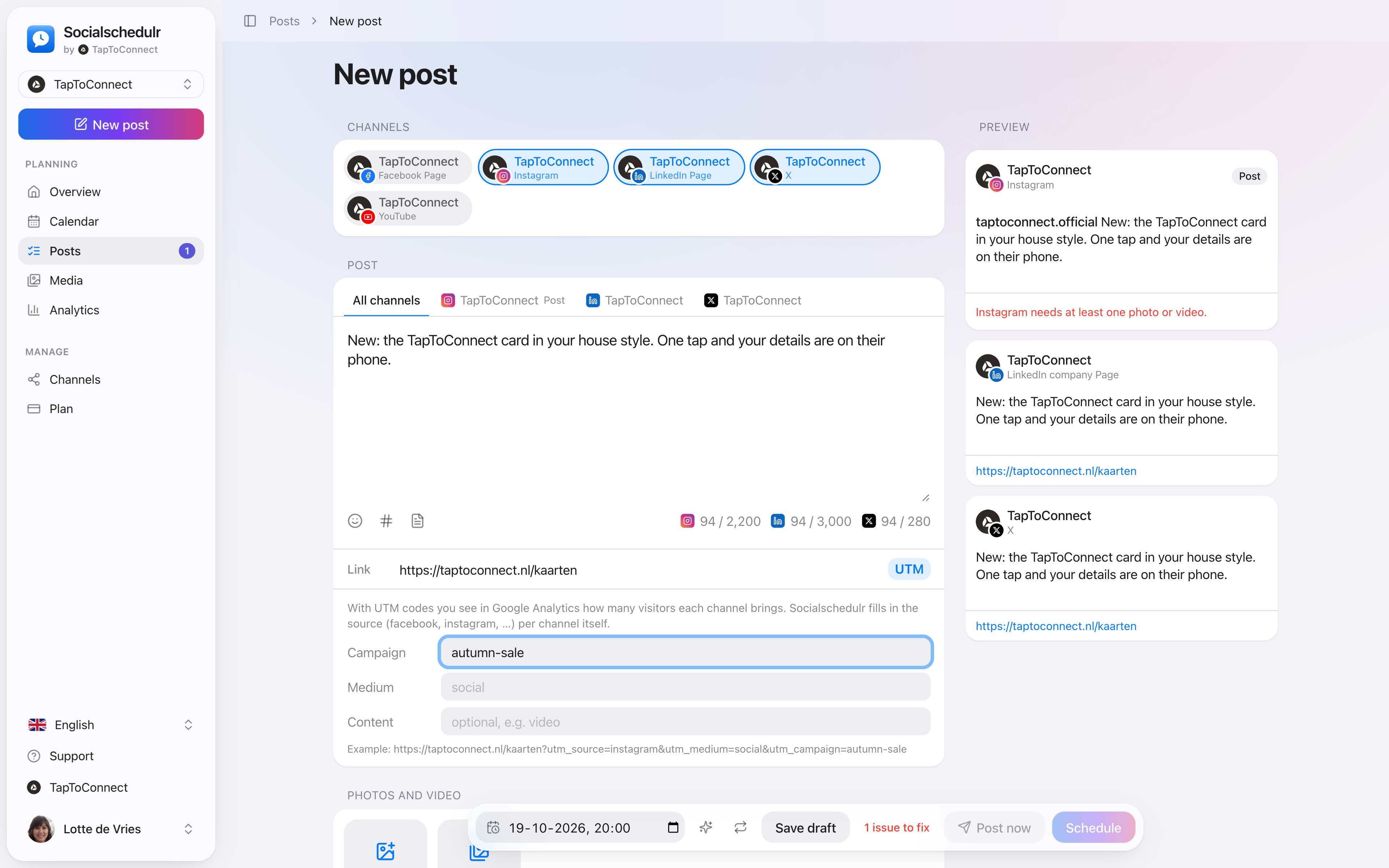
Enter a campaign name and Socialschedulr adds the right UTM codes to your link per channel. Google Analytics then shows exactly which channel brings in visitors.
In short
- Source per channel automatically: facebook, instagram, linkedin and so on
- Medium social by default
- You choose campaign and content yourself
- You see a preview of the final link
How it works.
- 1
Enter a link
UTM appears next to the field.
- 2
Pick a campaign name
For example autumn-sale.
- 3
Schedule it
Each channel gets its own version of the link.
An example
With the campaign autumn-sale, your link on Instagram becomes:
https://yoursite.com/sale?utm_source=instagram&utm_medium=social&utm_campaign=autumn-saleOn LinkedIn it says utm_source=linkedin. In Google Analytics you see under your campaign exactly how many visitors and purchases each channel brought in.
Tips for your campaign names
- Use short names without spaces, for example autumn-sale or vacancy-mechanic.
- Keep the same name for a campaign on all channels, so you can add them up in Google Analytics.
- Use the content field to tell variants apart, for example video and photo.
Step by step
You will find a detailed explanation with every button in the help centre: read the article.
See what each channel brings in.
Enter a campaign name and Socialschedulr adds the right UTM codes to your link for each channel. Google Analytics then shows how many visitors each channel brings in.
- Source filled in automatically per channel
- Choose campaign, medium and content yourself
- A preview of the final link
Analytics.
Spoken and subtitled in English. You will find more videos in the help centre.
See it in action.
A few parts of Socialschedulr that fit this topic, shown with sample data.
Your feed, before it goes live
Scheduled posts appear above your latest real posts.
A whole month in one go
Import your posts from Excel or Google Sheets, up to 200 at once.
Read next
Try it yourself.
All your socials in one calendar. Free for 14 days, no payment details. After that, pick a plan or carry on for free.