
 TapToConnect
The best time to post
on Instagram in 2026.
The right moment gives your post a head start. Two large 2026 studies show which days and hours work best on average, and where they disagree.
In short
- Tuesday, Wednesday and Thursday are the strongest days in 2026, according to both Sprout Social and Buffer.
- Saturday scores low in both studies.
- On the hour they differ: Sprout Social sees the peak from midday, Buffer more often in the morning and evening.
- Carousels get the highest engagement rate; Reels are mainly built for reach.
- Your own numbers are more reliable than any average.
What is the best time to post on Instagram in 2026?
On weekdays, especially Tuesday to Thursday. Sprout Social sees the most engagement in the afternoon, from 12:00 or 13:00, and on Tuesday and Wednesday into the evening. Buffer finds the highest engagement rate on Wednesday at 12:00 and 18:00 and on Thursday between 7:00 and 9:00. The weekend is weak in both studies.
These are averages. They come from customers of two US tools, spread around the world. They say something about large groups, not about your followers. Use the table as a starting point, then look at your own numbers. In Socialschedulr, the best times feature shows when your own followers engaged most.
Best times per day
| Day | Sprout Social 2026: peak window | Buffer 2026: top three hours |
|---|---|---|
| Monday | 14:00 to 16:00 | 18:00, 19:00, 20:00 |
| Tuesday | 13:00 to 19:00 | 15:00, 17:00, 19:00 |
| Wednesday | 12:00 to 21:00, and 23:00 | 8:00, 12:00, 18:00 |
| Thursday | 12:00 to 14:00 | 7:00, 8:00, 9:00 |
| Friday | No clear peak | 6:00, 21:00, 22:00 |
| Saturday | No peak, lowest day of the week | 20:00, 21:00, 22:00 |
| Sunday | No peak | 20:00, 21:00, 22:00 |
Your followers’ local time. Sources: Sprout Social (2026) and Buffer (2026). Averages across thousands of accounts worldwide.
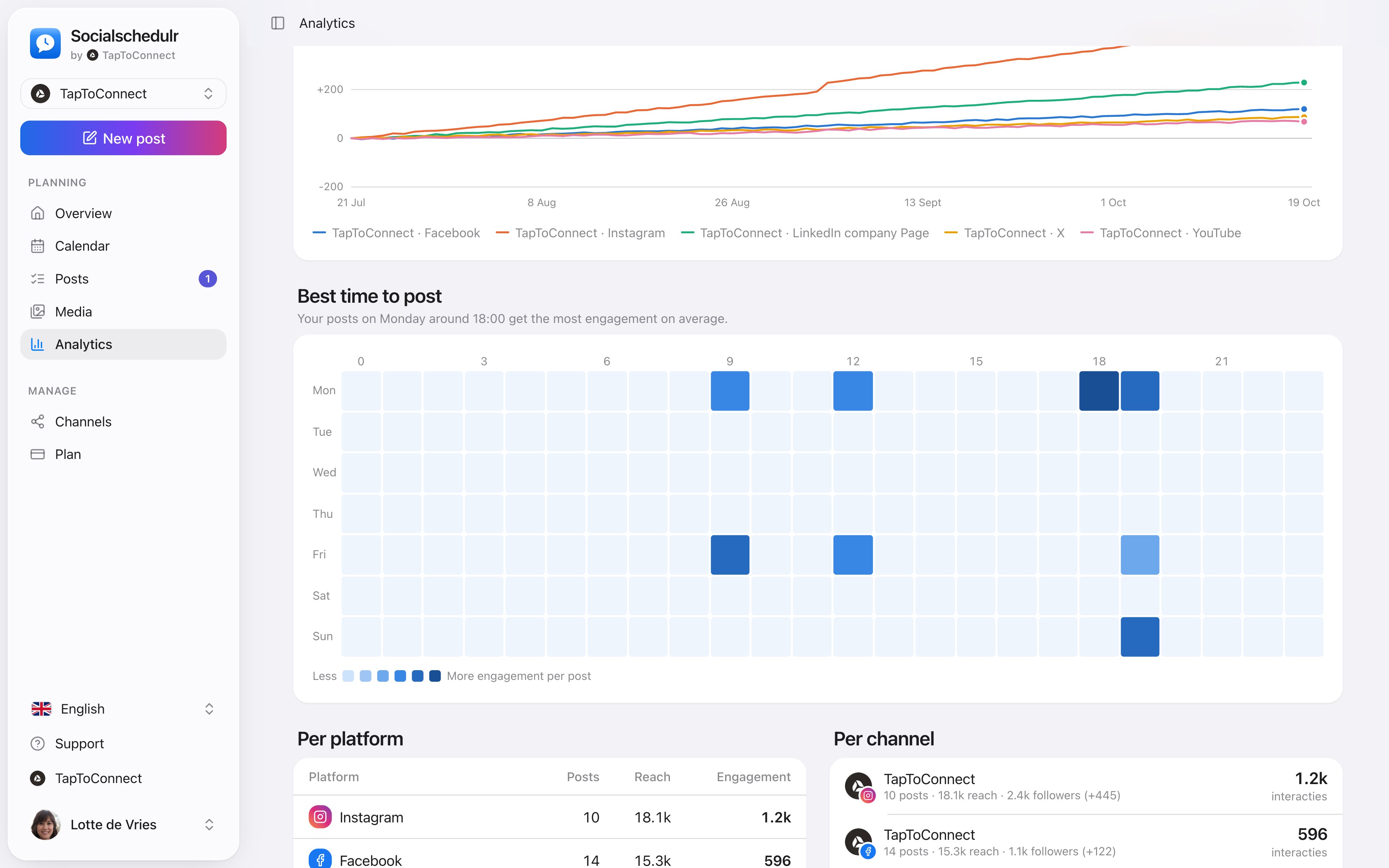
An overview by day and hour with the moments that got the most engagement
Why do the studies differ?
- Sprout Social (March 2026): nearly 2 billion engagements on about 307,000 profiles of more than 30,000 customers, measured from 27 November 2025 to 27 February 2026. Sprout shows the windows in which most engagement happened.
- Buffer (2026): 9.6 million Instagram posts from January 2024 to December 2025, ranked by median engagement rate (engagements divided by followers).
Sprout Social shows when most engagement happens. Buffer shows which posting moment scores best per post. Those are different questions. So test one moment from each list, for example Tuesday 13:00 and Wednesday 18:00, and see which works for your followers.
Does it matter if you post a Reel, carousel or Story?
| Post type | Median engagement rate | What the studies say about timing |
|---|---|---|
| Carousel | 6.9% | Buffer names Wednesday 12:00 and 18:00 and Thursday 9:00, the same top slots as for all posts. |
| Single image | 4.4% | No separate advice. Follow the table per day. |
| Reel | 3.3% | Buffer suggests evenings, 18:00 to 23:00, on Wednesday and Thursday, derived from its overall data. |
| Story | No figure | No timing data. Buffer suggests one to two Stories a day, Hootsuite two. |
Engagement rate here: engagements as a percentage of reach. Sources: Buffer, best content format (March 2026), Buffer, best time on Instagram (2026) and Hootsuite (April 2025).
Reels are built to reach people who do not follow you yet, and those react less. A lower engagement rate does not mean a Reel works worse. For Reels, look mainly at reach and views; for carousels, at saves and comments.
How to find your best time
- Post at different times for a month, using moments from both studies.
- See which posts got the most engagement per 100 people reached.
- Schedule your most important posts at those moments.
- Check again every quarter: your audience changes.
In Socialschedulr, Analytics shows per day and hour when your posts got the most engagement. In the editor, the three best moments of the past 90 days sit right next to the date: click and it is filled in.
A four-week experiment
- Weeks 1 and 2: post at varying moments from both studies: early morning, around lunch, in the afternoon and in the evening.
- Week 3: see which moments gave the most engagement per post.
- Week 4: post everything at the two best moments and compare.
Repeat this every six months. Your followers change, and so do their habits.
Analytics.
Spoken and subtitled in English. You will find more videos in the help centre.
See it in action.
A few parts of Socialschedulr that fit this topic, shown with sample data.
Your month fills itself
Schedule posts on any day and see at a glance what is scheduled and published.
One post, six channels
Write it once and see how it looks on each channel.
Your client approves on their phone
Through a link, without an account. Then the post is scheduled automatically.
Frequently asked questions.
Does timing matter for Reels?
Less than for regular posts, because Reels keep being shown to new people later on. Buffer suggests evenings between 18:00 and 23:00 on Wednesday and Thursday. The first hour still counts.
Does Socialschedulr suggest the best time for Instagram?
Yes. When you schedule, click the star next to the date. You see three moments when your posts got the most engagement in the past 90 days, for Instagram too. If you have not posted much yet, you see general advice.
Read next
Try it yourself.
All your socials in one calendar. Free for 14 days, no payment details. After that, pick a plan or carry on for free.