
 TapToConnect
Reels for your business.
No film crew needed.
Short videos often get the most reach on Instagram, TikTok and YouTube. All you need is your phone.
The basics
- Film vertically, 9:16
- The point in the first seconds
- Subtitles: many people watch without sound
- Daylight, and hold your phone still
One video, three platforms
A good Reel often works as a TikTok and a YouTube Short too. In Socialschedulr you choose all three in one post, with a separate text per platform and your own cover for Instagram. Socialschedulr checks in advance whether your video meets each platform’s requirements.
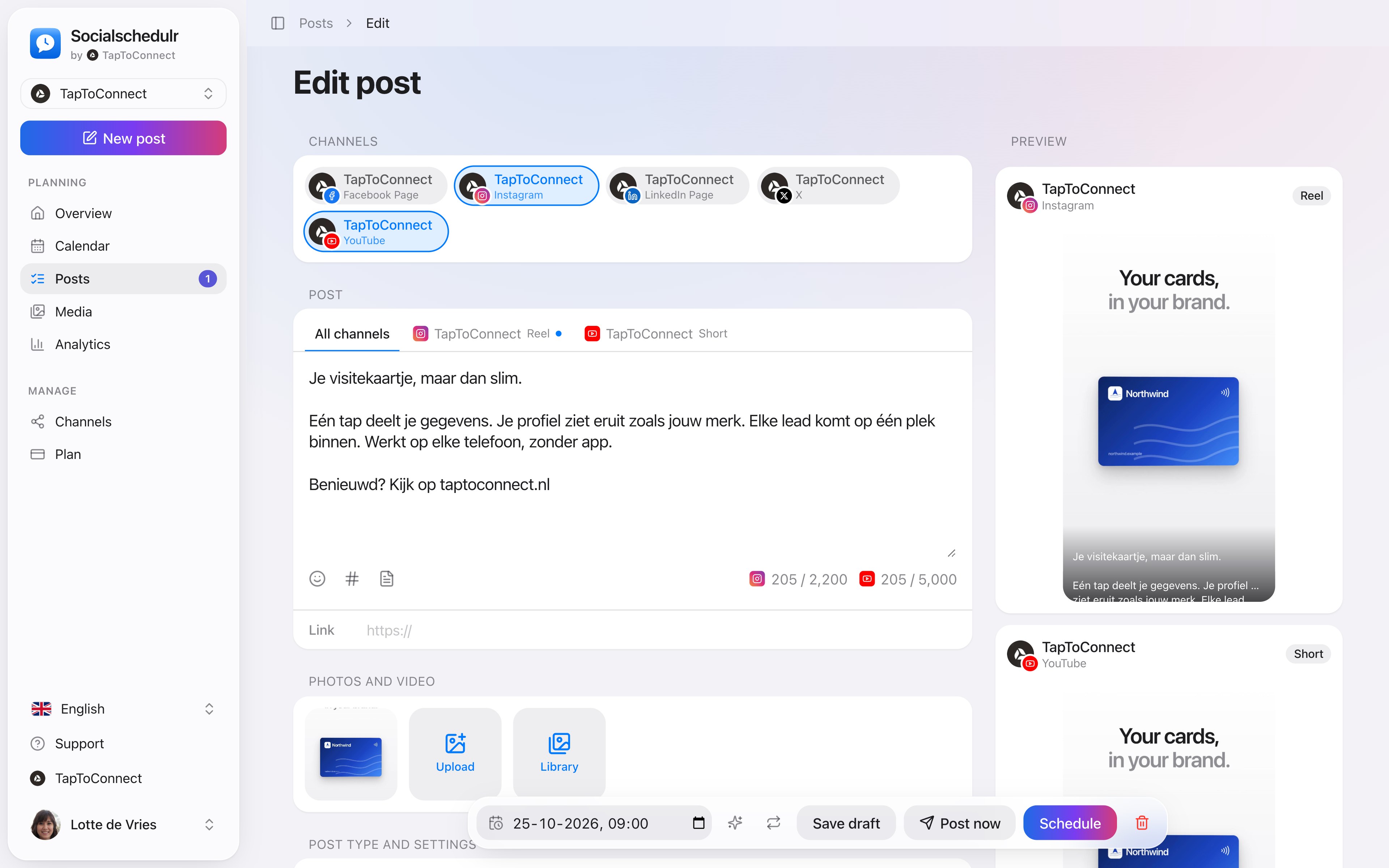
A post as an Instagram Reel and a YouTube Short, with a preview of both
A recording day
Film five to ten short videos on one day and spread them over the weeks. That keeps you visible for a month with one afternoon of work.
Technical requirements in short
- Vertical 9:16, for example 1080 by 1920 pixels.
- A cover that also looks good in the square grid.
- Subtitles on screen, because many people watch without sound.
How to do this in Socialschedulr.
The right format for each channel.
The same post can be a Reel on Instagram, a Short on YouTube and a regular post on Facebook. Socialschedulr checks whether your photos and videos meet the requirements of each platform.
- Reels and stories on Facebook and Instagram
- Carousels of up to 10 photos and videos on Instagram
- Shorts and videos on YouTube, with title, tags and thumbnail
- TikTok settings such as who can comment or make a Duet
All your photos and videos in one place.
Upload your images once and use them in as many posts as you like. For each file you see how many posts already use it.
- Photos and videos, filtered by type
- Upload from your computer or phone
- Pick straight from the post editor
Posts and calendar.
Spoken and subtitled in English. You will find more videos in the help centre.
See it in action.
A few parts of Socialschedulr that fit this topic, shown with sample data.
A whole month in one go
Import your posts from Excel or Google Sheets, up to 200 at once.
Your best moment
From your own numbers: three suggested moments, picked in one click.
Read next
Try it yourself.
All your socials in one calendar. Free for 14 days, no payment details. After that, pick a plan or carry on for free.