
 TapToConnect
Per channel, per user
or a flat price?
The starting price says little. What you pay depends on how a scheduler charges. Here is how to work it out for your situation.
Three ways of charging
- Per channel, like Buffer and Publer: cheap with few channels, expensive with many.
- Per user, like Hootsuite, Sprout Social and Agorapulse: every extra team member raises the price.
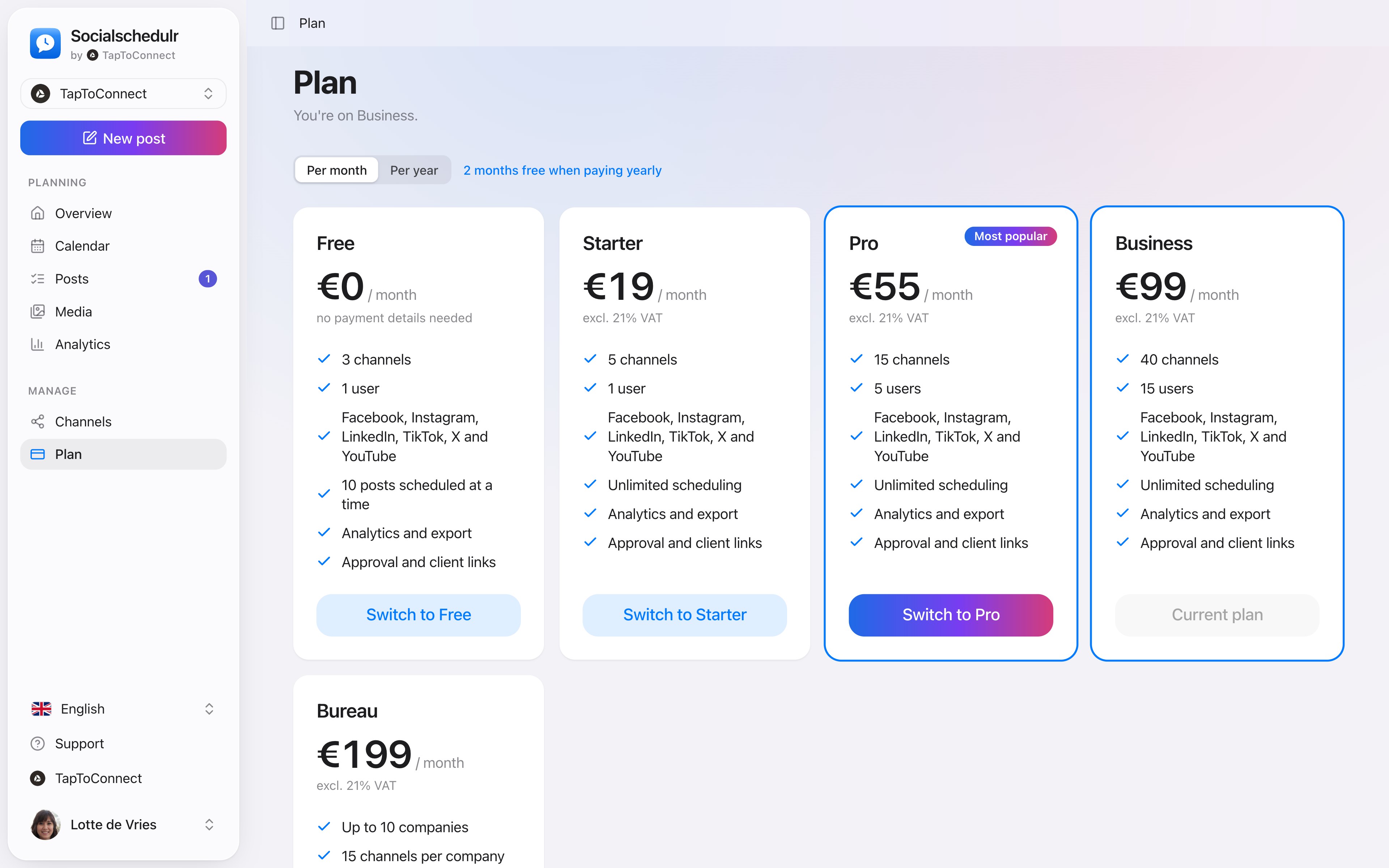
- Per plan, like Socialschedulr, Loomly and Later: a flat price for a number of channels and users.
Worked examples
Freelancer with 3 channels. Buffer Essentials: 3 × $5 = $15 per month. Socialschedulr: free, or Starter €19 if you want to schedule more than 10 posts at a time.
Team of 3 with 10 channels. Buffer Team: about $100 per month. Hootsuite Standard: about $297. Agorapulse Standard: $237. Socialschedulr Pro: €55.
Agency with 8 clients. Per channel or per user this quickly runs into hundreds per month. Socialschedulr Agency: €199 per month for up to 10 companies.
Work it out for a year from now
You usually pick a scheduler for years. So do not only look at what you need now, but also at what you will need a year from now:
- Will channels be added? Start with Facebook and Instagram but want TikTok or YouTube later, and a price per channel rises fast.
- Will people be added? An intern, a freelancer or a client who looks along: with a price per user, every login counts.
- Do you need features from a more expensive plan? At many schedulers, approval or reports only come with a higher plan.
At Socialschedulr every feature is in every plan. You only move to a bigger plan when you need more channels or users, and you can do that at any time.
Also watch out for
- Limits on the number of posts per month or per channel
- Features that only come with a more expensive plan, such as approval or reports
- Add-ons, for example for analytics or X
- Whether you can cancel monthly, and whether a yearly plan can be stopped mid-term
- VAT and currency: many tools charge in dollars without a proper European VAT invoice
How Socialschedulr charges.
Every feature, in every plan.
You only choose how many channels and users you need. Switch at any time; the difference is settled straight away. Paying yearly gives you two months free.
- Carry on for free with 3 channels
- Pay by card, iDEAL or Bancontact
- Cancel monthly, invoice with VAT
Six platforms, one place.
Connect Facebook Pages, Instagram, LinkedIn (profile and company page), TikTok, X and YouTube. You log in with the platform itself; Socialschedulr only gets permission to post on your behalf.
- Connect in a few clicks
- A notice when a channel needs to be reconnected
- We never see your password
Plans and payment.
Spoken and subtitled in English. You will find more videos in the help centre.
See it in action.
A few parts of Socialschedulr that fit this topic, shown with sample data.
Your best moment
From your own numbers: three suggested moments, picked in one click.
A report with your logo
In your client's inbox every month, automatically, white label too.
Frequently asked questions.
What is cheapest?
With few channels and just yourself: per channel. With a team, many channels or several clients: a fixed plan.
What counts as a channel?
Every connected account counts as one channel. A Facebook Page, an Instagram account and a LinkedIn company page are three channels together.
Read next
Try it yourself.
All your socials in one calendar. Free for 14 days, no payment details. After that, pick a plan or carry on for free.