
 TapToConnect
Socialschedulr or Agorapulse?
Inbox and reports, paid per user.
Agorapulse is strong in the shared inbox and reports, and works per user with 10 profiles per plan.
In short
- Agorapulse costs $79, $119 or $149 per user per month billed yearly, with 10 profiles.
- Simple approval comes with Professional; multi-step approval in Custom.
- White-label reports are already in Standard.
- Socialschedulr has two-step approval in every plan, with no price per user.
Agorapulse and Socialschedulr side by side
| Socialschedulr | Agorapulse | |
|---|---|---|
| Price | Free, or from €19 per month (5 channels) | $79 to $149 per user per month (billed yearly) |
| Small team (about 10 channels, 3 users) | €55 per month (Pro: 15 channels, 5 users) | $237 per month (Standard, 3 users, 10 profiles) |
| Free plan | Yes: 3 channels, 1 user, 10 posts scheduled at a time | A 30-day trial, then a limited free plan |
| Platforms | Facebook, Instagram, LinkedIn (profile and company page), TikTok, X, YouTube | The major platforms |
| Approval and client preview | In every plan, in two steps, client without an account | Simple from Professional, multi-step in Custom |
| Reports | PDF with your own logo, emailed automatically, white label too | White-label reports from Standard |
| Language and invoice | English and Dutch, invoice in euros with VAT | English and other languages, invoice in dollars |
| Connect an AI assistant | Yes, Claude and other MCP assistants (ChatGPT in review) | AI reply suggestions in Custom |
Where Agorapulse is strong
- A strong shared inbox and moderation
- White-label reports in every plan
- Fast support
- Shared calendars and labels
Where Socialschedulr is different
- No price per user: 5 users are included in Pro for €55.
- Two-step approval, with your client too, in every plan.
- Up to 15 channels in Pro, 40 in Business.
- Invoice in euros with VAT.
When to choose Agorapulse
If answering comments and messages is a big part of your work and you need a strong inbox.
When to choose Socialschedulr
If scheduling, approval and reporting are central and you work with a team without paying per person.
Switching from Agorapulse in four steps
- Create an account. You get every feature for 14 days, without payment details. So you do not need to cancel Agorapulse yet.
- Connect your channels. You log in with Facebook, Instagram, LinkedIn, TikTok, X or YouTube. A channel can be connected to two schedulers at the same time.
- Move your scheduled posts. Got a lot of them? Put them in a spreadsheet and import up to 200 posts in one go.
- Cancel Agorapulse once everything runs. Run both side by side for a week or two, check that everything is published on time, then switch for good.
What does Socialschedulr cost?
From €0 with 3 channels; paid plans from €19 per month. Every feature is included in every plan. See all pricing or work it out on per channel or flat price.
How Socialschedulr works.
A few things you notice straight away when you switch from Agorapulse.
See what works, and do more of it.
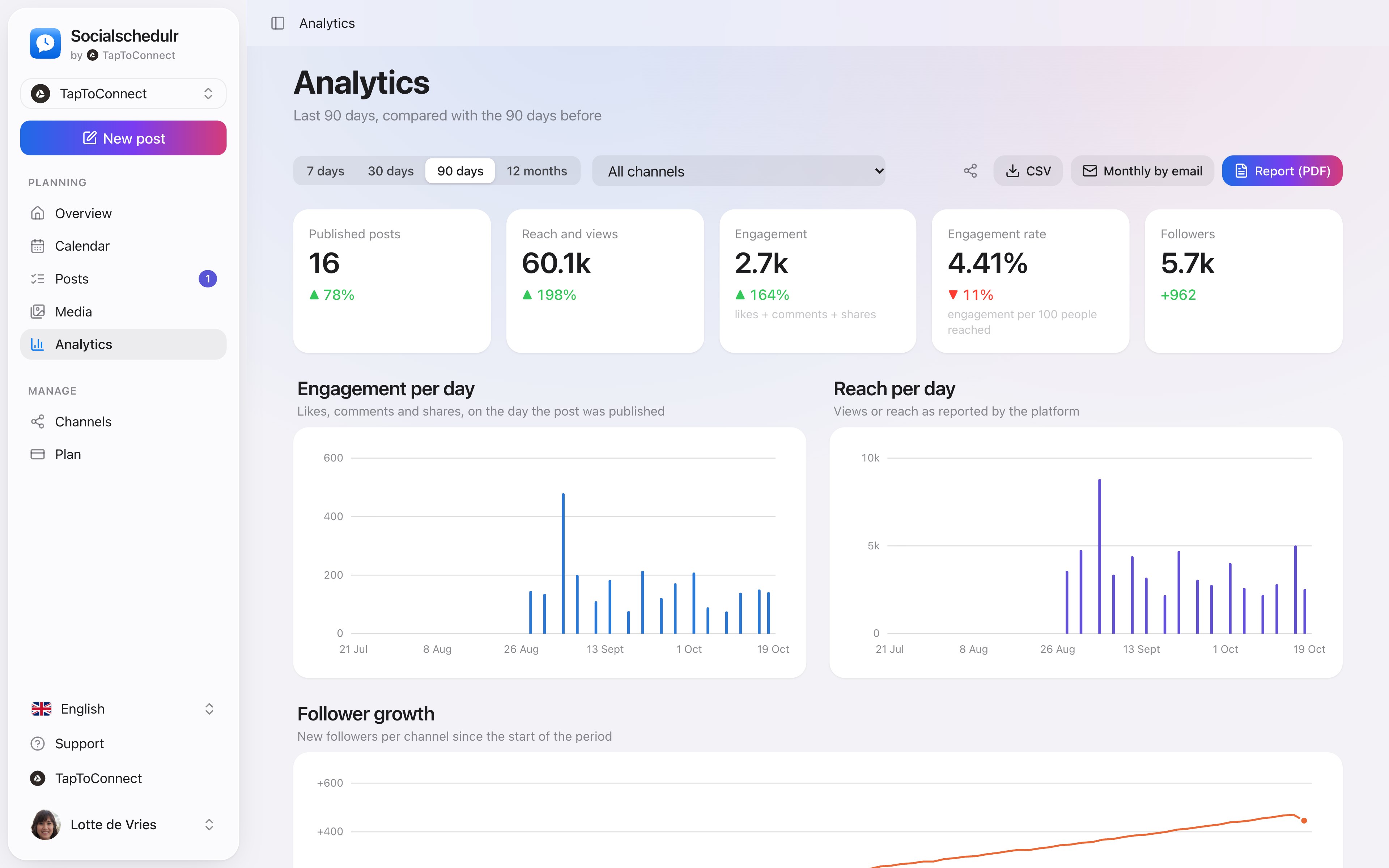
Reach, interactions and followers of all your channels on one screen, compared with the previous period. You see at a glance which posts performed best.
- Periods from 7 days to 12 months
- Follower growth per channel
- Export to CSV
Everyone their own role.
Invite colleagues or freelancers as owner, admin or editor. Editors write and schedule, admins approve and manage channels and the subscription.
- Invite with a link that is valid for 7 days
- Two-step verification, which you can require for the whole team
- Activity log: see who did what and when
Your first post in five minutes.
Spoken and subtitled in English. You will find more videos in the help centre.
See it in action.
A few parts of Socialschedulr that fit this topic, shown with sample data.
On your phone too
No app needed: your schedule and posts in any browser.
Your month fills itself
Schedule posts on any day and see at a glance what is scheduled and published.
Frequently asked questions.
Does Socialschedulr have white-label reports?
Yes. Automatic PDF reports can carry your own logo and leave out the Socialschedulr name.
Can I use Agorapulse and Socialschedulr side by side for a while?
Yes. A channel can be connected to several schedulers. Just make sure you do not schedule the same post in both, or it will be published twice.
Read next
Try it yourself.
All your socials in one calendar. Free for 14 days, no payment details. After that, pick a plan or carry on for free.