
 TapToConnect
Socialschedulr or Later?
Visual planning, with or without X.
Later started as an Instagram scheduler and is still strong in visual planning, link in bio and creators. How does it compare with a scheduler that has every feature in every plan?
In short
- Later starts at $18.75 per month (Starter, billed yearly) with 30 posts per profile per month.
- Later does not support X. It does support Pinterest, Threads and Snapchat.
- Approval (internal and external) comes with Later Growth ($37.50 per month, billed yearly).
- At Socialschedulr you schedule without limits from Starter, with every feature.
Later and Socialschedulr side by side
| Socialschedulr | Later | |
|---|---|---|
| Price | Free, or from €19 per month (5 channels) | From $18.75 per month (Starter, billed yearly) |
| Small team (about 10 channels, 3 users) | €55 per month (Pro: 15 channels, 5 users) | $37.50 per month (Growth: 16 profiles, 2 users, 180 posts per profile per month), extra user $3.75 |
| Free plan | Yes: 3 channels, 1 user, 10 posts scheduled at a time | No, but a 14-day trial |
| Platforms | Facebook, Instagram, LinkedIn (profile and company page), TikTok, X, YouTube | Instagram, Facebook, Threads, Pinterest, TikTok, LinkedIn, YouTube, Snapchat (no X) |
| Approval and client preview | In every plan, in two steps, client without an account | Internal and external approval from Growth |
| Reports | PDF with your own logo, emailed automatically, white label too | Analytics, history up to 3 months (Starter) or 1 year (Growth) |
| Language and invoice | English and Dutch, invoice in euros with VAT | English, invoice in dollars |
| Connect an AI assistant | Yes, Claude and other MCP assistants (ChatGPT in review) | AI credits for captions |
Where Later is strong
- Visual planner and Instagram grid
- Link in bio and tools for creators
- Supports Pinterest, Threads and Snapchat
- Collecting customer content (UGC)
Where Socialschedulr is different
- X too, and LinkedIn company pages next to your profile.
- Unlimited scheduling from Starter, no limit per profile per month.
- Approval with your client in every plan, Free too.
- Analytics up to 12 months back in every plan.
When to choose Later
If Instagram and Pinterest are your main channels, you work as a creator and link in bio and UGC matter to you.
When to choose Socialschedulr
If you are also active on X and LinkedIn, want to schedule a lot without a limit per profile, or want client approval without a more expensive plan.
Switching from Later in four steps
- Create an account. You get every feature for 14 days, without payment details. So you do not need to cancel Later yet.
- Connect your channels. You log in with Facebook, Instagram, LinkedIn, TikTok, X or YouTube. A channel can be connected to two schedulers at the same time.
- Move your scheduled posts. Got a lot of them? Put them in a spreadsheet and import up to 200 posts in one go.
- Cancel Later once everything runs. Run both side by side for a week or two, check that everything is published on time, then switch for good.
What does Socialschedulr cost?
From €0 with 3 channels; paid plans from €19 per month. Every feature is included in every plan. See all pricing or work it out on per channel or flat price.
How Socialschedulr works.
A few things you notice straight away when you switch from Later.
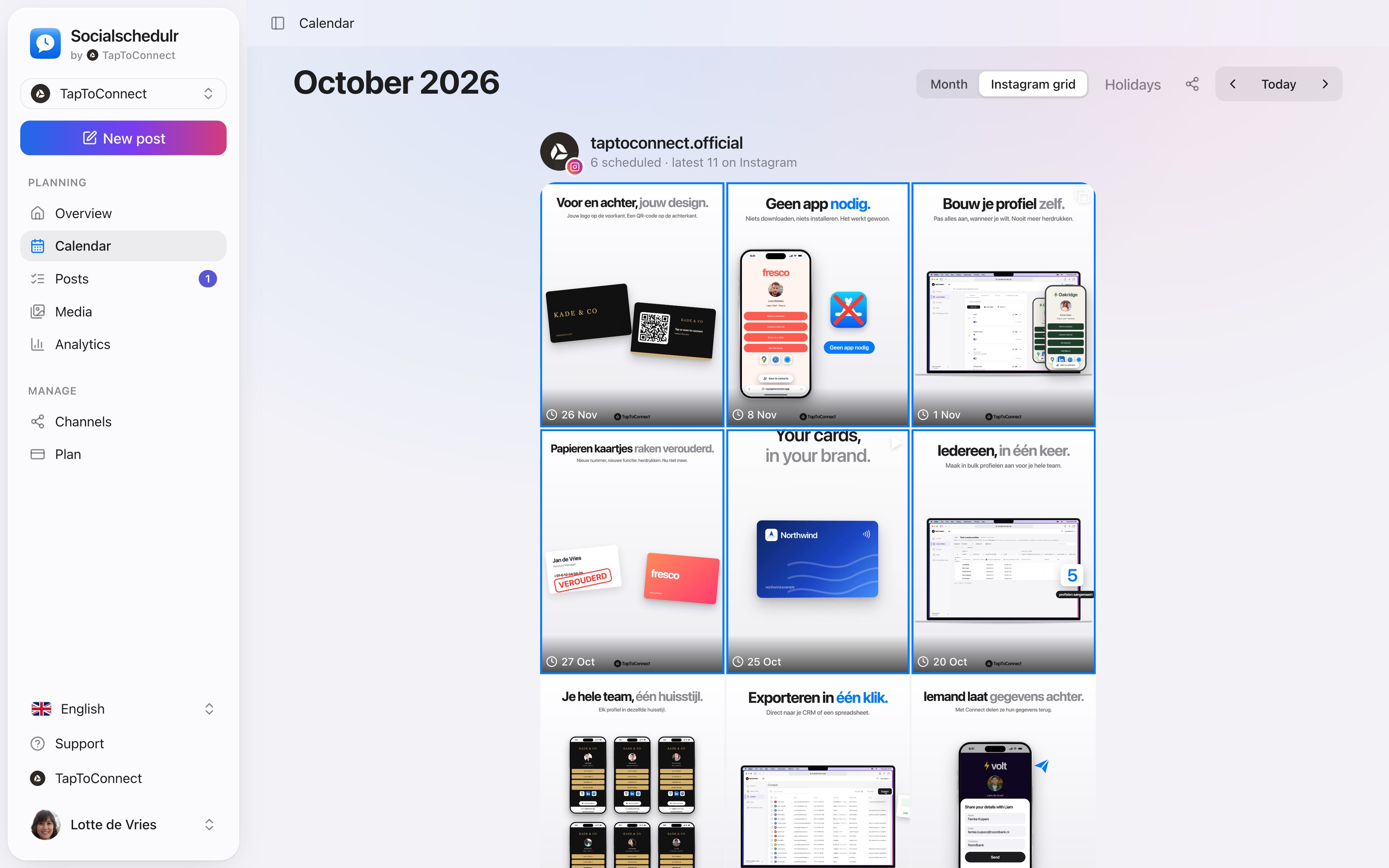
See your feed before it goes live.
The Instagram grid view shows your scheduled posts above your latest real posts. So you know in advance whether colours and topics work well together.
- Scheduled posts with their date above your existing feed
- Click a post to edit it
- Also handy to show a client the feed in advance
The right format for each channel.
The same post can be a Reel on Instagram, a Short on YouTube and a regular post on Facebook. Socialschedulr checks whether your photos and videos meet the requirements of each platform.
- Reels and stories on Facebook and Instagram
- Carousels of up to 10 photos and videos on Instagram
- Shorts and videos on YouTube, with title, tags and thumbnail
- TikTok settings such as who can comment or make a Duet
Your first post in five minutes.
Spoken and subtitled in English. You will find more videos in the help centre.
See it in action.
A few parts of Socialschedulr that fit this topic, shown with sample data.
Your month fills itself
Schedule posts on any day and see at a glance what is scheduled and published.
One post, six channels
Write it once and see how it looks on each channel.
Frequently asked questions.
Does Later support X (Twitter)?
According to Later’s pricing page on 12 November 2026, it does not. Socialschedulr does support X.
Does Socialschedulr have an Instagram grid?
Yes. The calendar shows your scheduled posts above your latest Instagram posts, so you see whether everything fits together.
Can I use Later and Socialschedulr side by side for a while?
Yes. A channel can be connected to several schedulers. Just make sure you do not schedule the same post in both, or it will be published twice.
Read next
Try it yourself.
All your socials in one calendar. Free for 14 days, no payment details. After that, pick a plan or carry on for free.