
 TapToConnect
Your whole month.
In one calendar.
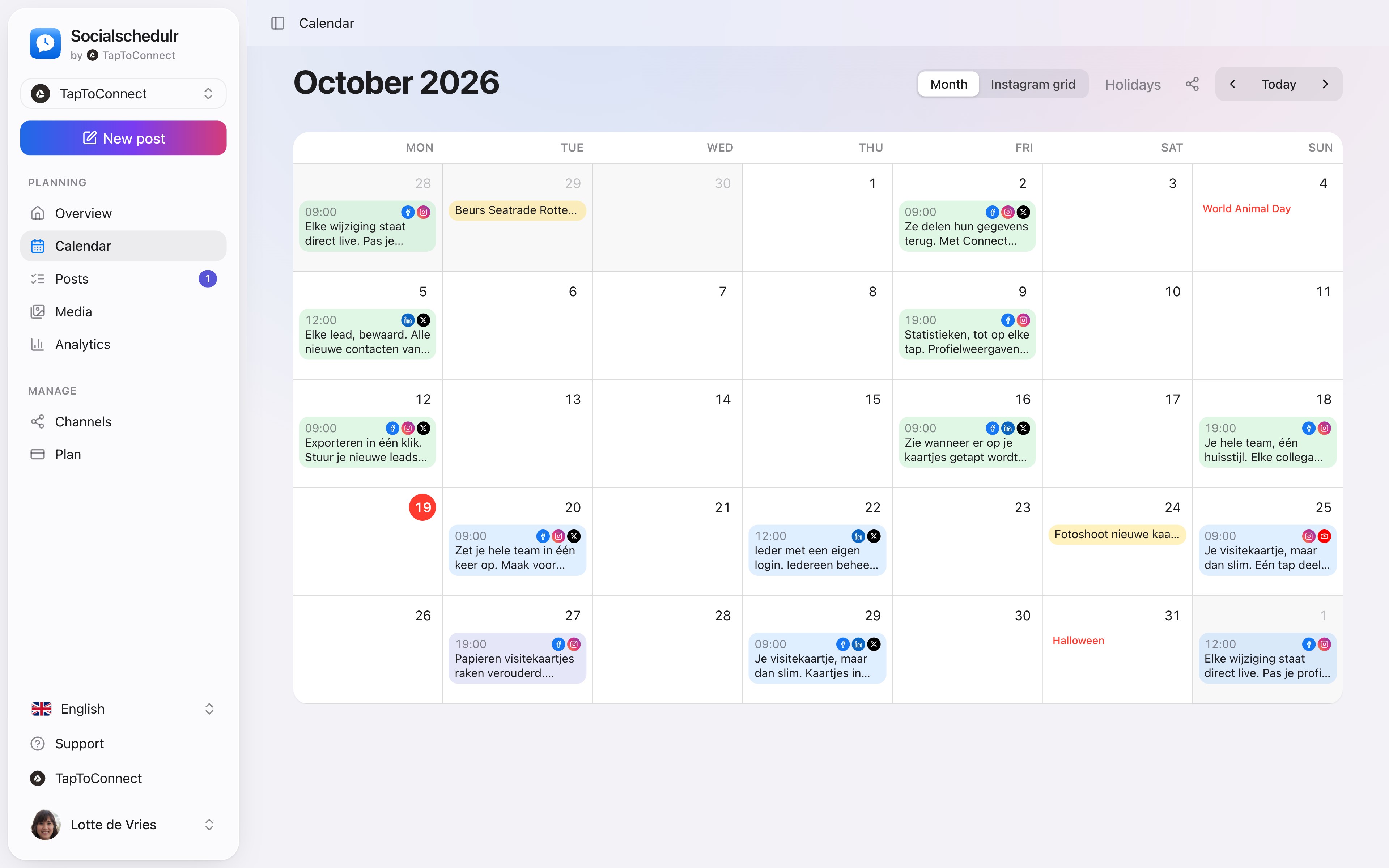
No more separate spreadsheet next to your scheduler. In the Socialschedulr calendar you see and plan everything.
What you see
- All scheduled and published posts of all your channels, with a colour per status
- Holidays and special days for the Netherlands and Belgium, from King’s Day to Black Friday
- Notes on a day, such as "campaign starts"
- Your Instagram grid with the posts still to come
Plan from the calendar
Click a day to create a post right there. On your phone the calendar shows as a list per day. See the calendar.
Fill a month in one afternoon
- Pick three or four regular themes per week, for example a tip, a product, a customer and behind the scenes.
- Put the ideas for the whole month in a spreadsheet: date, time, text and channels.
- Import the file and add the photo per post in the calendar.
- Let a colleague or client approve, and you are done.
How it works.
- 1
Connect your channels
Log in with Facebook, Instagram, LinkedIn, TikTok, X or YouTube. It takes a few minutes.
- 2
Plan your posts
Write once, adjust per channel and pick a moment. Or import a whole month from a spreadsheet.
- 3
Socialschedulr publishes them
Right on time, even when you are away. Afterwards, the analytics show what worked.
Your whole month at a glance.
All scheduled and published posts from all your channels in one monthly view. The colour tells you straight away whether something is scheduled, published or still a draft.
- Click a day to schedule a post right there
- Notes on a day, such as ‘campaign starts’ or ‘shop closed’
- Holidays and special days for the Netherlands and Belgium
- Schedule a post on any day from the calendar
See your feed before it goes live.
The Instagram grid view shows your scheduled posts above your latest real posts. So you know in advance whether colours and topics work well together.
- Scheduled posts with their date above your existing feed
- Click a post to edit it
- Also handy to show a client the feed in advance
Two hundred posts in one go.
Put your posts in Excel, Numbers or Google Sheets, save as CSV and import them. Date, time, text, link, photo and channels all land in the right place.
- Up to 200 posts per import
- A sample file to get you started
- Choose whether they are scheduled straight away or saved as drafts first
Close at hand, wherever you are.
Socialschedulr works in your phone’s browser. Quickly editing a post or checking your schedule works anywhere, without installing an app.
- Calendar and editor adapt to your screen
- Upload a photo straight from your phone
- Light and dark, just like your phone
Posts and calendar.
Spoken and subtitled in English. You will find more videos in the help centre.
Read next
Try it yourself.
All your socials in one calendar. Free for 14 days, no payment details. After that, pick a plan or carry on for free.